

Why trades win or lose on Google Maps, not the website
For a trade, the Maps pack at the top of the results is the whole game. It appears above every website, it shows the phone number, and on a mobile the Call button is one tap. Two plumbers I work for took 208 calls from Google in a quarter, and almost every one of them came from the profile, not from a website visit.
The website still matters, but for a different reason: it is what the profile stands on. Google reads the site to confirm what the business does and where. A trade with a two-paragraph home page and no suburb pages is asking Google to guess.
The five things that decide a tradie’s Maps position
- Primary category. "Plumber", not "Contractor". "Electrician", not "Business service". The single most common thing I fix.
- Services list. Every service you do, named the way customers name it: blocked drains, hot water repairs, switchboard upgrades, not "general plumbing".
- Reviews, recently and steadily. Not 200 reviews from 2019. Ten a month, every month, mentioning the job and the suburb.
- Photos of real work. Vans, jobs, the team. Stock photos of a smiling model with a spanner do nothing.
- A website that names the suburbs. One page per service, one page per suburb you want to be found in.
| Calls before | Calls after | Website clicks before | Website clicks after | |
|---|---|---|---|---|
| Gold Coast plumber | 43 | 118 | 83 | 185 |
| Logan plumber | 36 | 90 | 74 | 144 |
Service-area businesses: the tradie problem Google created
Most trades work from home or a shed and go to the customer. Google calls that a service-area business and hides the address. It ranks you from where the pin is, which is usually your house, and the further a searcher is from that pin the harder it gets. You cannot fix that with a fake address; Google suspends profiles for it, and I have seen the damage.
What you can do is set the service area honestly, build a page for each suburb that names it properly, win reviews from customers in those suburbs, and watch the ranking grid. A scan every month shows exactly how far your pin reaches and which suburbs need their own page.
What the work looks like, week to week
- Monday: review requests sent to last week’s customers; any new review answered.
- A post with a photo of a real job, with the service and suburb in the caption.
- Services, categories and hours checked against what the business is actually doing this season.
- One website improvement: a new suburb page, a service page expanded, a dead link fixed.
- Monthly: a 7 by 7 ranking scan for the main search, compared with last month, and a call about what moved.
What to expect, by trade
Emergency trades (plumbers, electricians, locksmiths) see the fastest return because the search happens at the moment of need and the Call button closes it. Project trades (builders, landscapers, pool builders) see a slower, bigger return: fewer searches, bigger jobs, and the website does more of the convincing. Either way the Maps pack is where it starts.
Checklist
The tradie profile check
- Is the primary category your actual trade?
- Does the services list have at least ten real services?
- Did you get a review in the last 14 days?
- Are the last five photos of real jobs, with dates in the last three months?
- Does your website have a page that names your home suburb and the three next to it?
- Is your phone number identical on the profile, the website and your van?
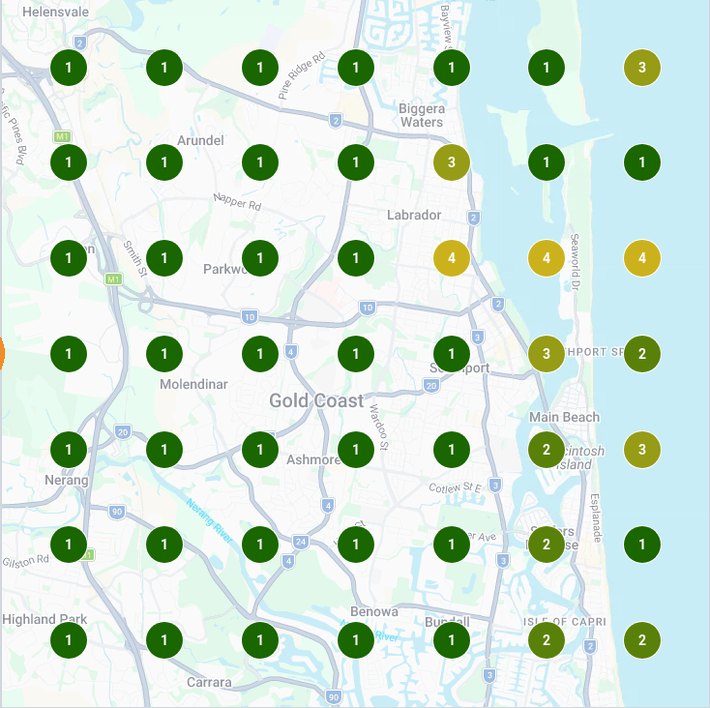
A finished ranking grid: a Gold Coast plumber in the top 3 at 46 of 49 scan points, 1 October 2026. Every engagement starts and is measured with a scan like this.